article
All articlesAstro vs. Next.js vs. Webflow: Which to Pick for a Company Website
Webflow is a ready-made platform; Astro and Next.js are frameworks for custom builds. Here's when Webflow is enough, when to reach for Astro, when Next.js earns its place, and how to decide.
- General
- 6 minutes
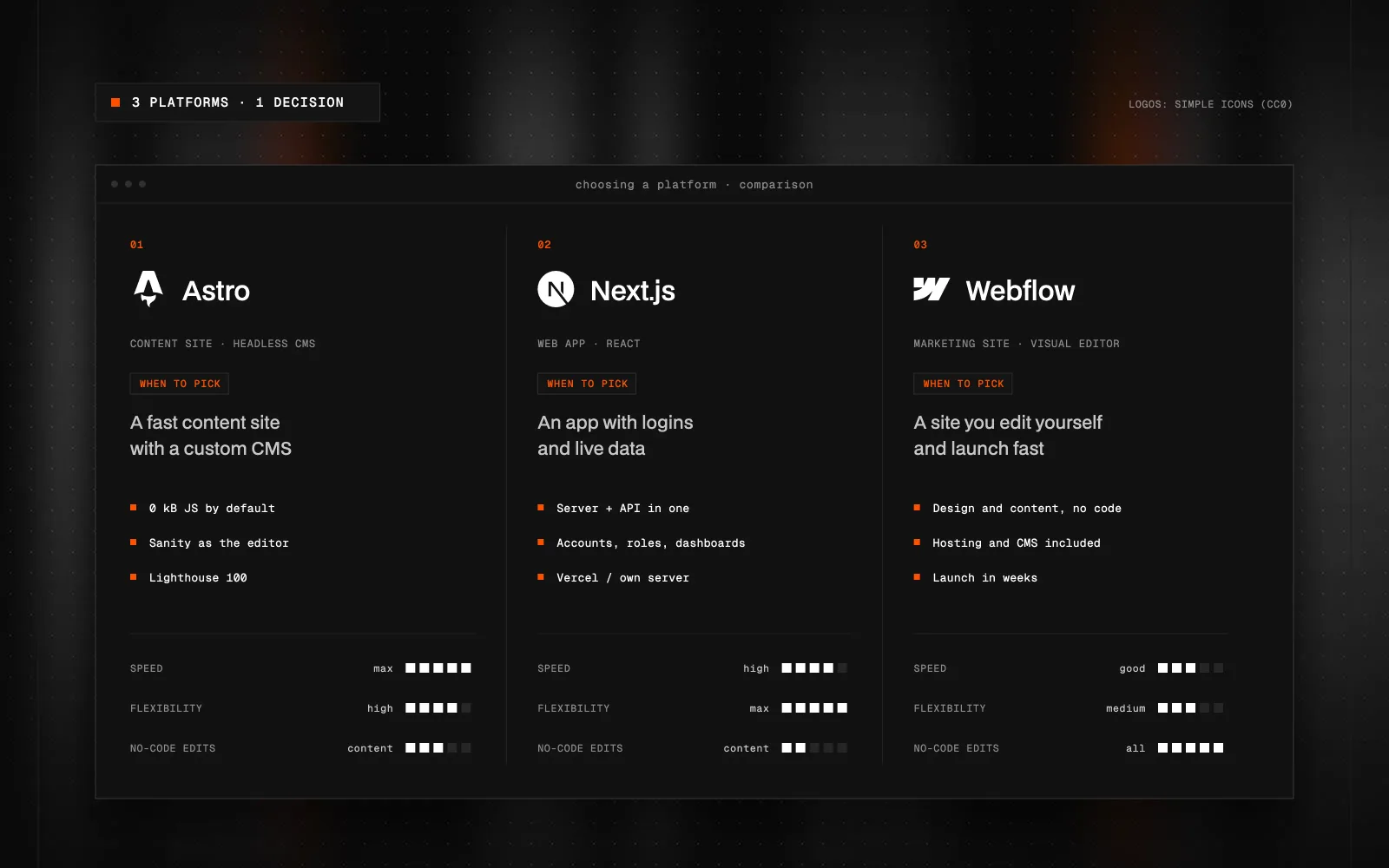
Quick Summary (TL;DR): Webflow is a ready-made platform: visual editor, CMS and hosting in one. It suits brochure sites that the marketing team wants to edit themselves, layouts included. Astro and Next.js are frameworks: the site is built in code and content usually lives in a headless CMS such as Sanity. Astro is built for content sites: it renders HTML and only ships JavaScript to the browser where it's genuinely needed, which makes it strong on speed and SEO. Next.js is a React framework for sites that behave more like applications: logins, personalisation, server-side logic. The deciding factors are who will edit the site, how much content there is, and whether the site needs application logic. Webflow fits when marketing wants to change the design directly in a visual editor, Astro with Sanity fits a company site of any size with modular pages and a focus on performance, and Next.js fits a site with logic.
What's the main difference between Astro, Next.js and Webflow?
Webflow is a ready-made platform: visual editor, CMS and hosting in one package. Astro and Next.js are frameworks. The site is built in code, and content usually lives separately in a headless CMS; in my case, Sanity.
Astro is built for content sites. It renders pages as HTML and only ships JavaScript to the browser where it's genuinely needed. Next.js is a React framework for sites that behave more like applications: logins, personalisation, lots of interaction and logic on the server.
I work in all three, so I won't pretend one of them wins. Each fits a different situation, and below I'll show you how to recognise yours.
When is Webflow enough?
Webflow is a good choice when you need a brochure site that marketing will edit on their own, including page layouts. Designer, CMS and hosting sit in one place, and after handover you don't need a developer for every change.
- Brochure sites, landing pages, campaigns.
- The team wants to change sections and build new pages without code.
- There's a reasonable amount of content without complex relationships.
You may hit Webflow's limits with large volumes of content, complex data relationships or extensive application logic. Custom code and external services alone are not a reason to leave: Webflow has an API, and integrations are a normal part of a website. What matters is whether the solution stays clear, maintainable and within the project's limits.
When should you choose Astro?
Astro fits content sites where speed and SEO decide: company websites, blogs, documentation, case study libraries. The default output is plain HTML, and interactive pieces, so-called islands, only load where they're needed. The rest of the page stays static.
- The site is mostly content, not an application.
- Load speed and Core Web Vitals matter to you.
- You want content in a headless CMS so you can use it beyond the website.
- You run several languages or many pages generated from data.
I also use Astro when moving sites off Webflow after a client hits the platform's ceiling. Content moves into Sanity and the site stays fast without shipping all of React to the browser.
When should you choose Next.js?
Next.js makes sense when a large part of the project is a React application: a client area, logins, personalisation and connected interactions. It supports server rendering and integration with Sanity's live preview. Astro also has server endpoints and server rendering, so a form or an API integration alone does not call for Next.js.
- The site is half an application.
- You are building a connected React application with logic on the client and server.
- Your team already works in React and will keep developing the site.
The cost is complexity. For a pure content site Next.js is often more tool than you need, and it usually ships more JavaScript to the browser than Astro. You can tune that, but it's work you don't have to do with Astro.
How does editing differ for the team?
In Webflow, marketing edits directly on the page and can change layouts too. With Astro or Next.js plus Sanity, content is edited in Studio. With Visual Editing you click text in the site preview and Studio opens the right field, so editors see what they're changing. Pages are composed from modular blocks: a developer sets them up against the design at the start, and from then on marketing builds new pages, reorders sections and edits content themselves, without a developer.
This is often the real decision. If editors want to design layouts directly in a visual editor, Webflow is the more natural fit. If they want to compose pages from ready-made blocks and reuse the same content across pages, languages and channels, Sanity wins. I go deeper in Sanity CMS: what it is and when it's worth it.
Which is more expensive to run and develop?
Actual amounts depend on the project, so in general terms: with Webflow you pay a platform subscription and don't need a developer for routine edits. With Astro and Next.js you mainly pay for development. Hosting and the CMS tend to be inexpensive on smaller projects, but every new template or section type is work in code.
What decides it isn't the launch cost but who will edit the site a year from now, how often, and how big the changes are. Once you know that, the choice is usually obvious.
How do you decide in practice?
- Webflow: marketing wants to design and change layouts directly in a visual editor.
- Astro + Sanity: a company site of any size that marketing composes from blocks, speed and SEO matter, little interaction.
- Next.js + Sanity: a React application with logins, personalisation and connected interactions.
- Switching: you're outgrowing Webflow or WordPress and want to take your content with you, which means a website migration.
What to take away
Webflow, Astro and Next.js aren't competitors on a single scale. Webflow solves a quick start and an independent editorial team, Astro solves performance for content sites, and Next.js handles sites with application logic. The wrong choice only shows a year in, when backing out is expensive, so decide based on how the site will live after launch.
If you're not sure, drop me a line. We'll go through what your site actually needs, and I'll tell you when Webflow is the right and cheaper route.
FAQ
Is Astro better than Next.js?
Neither is better in general. Astro is built for content sites and ships minimal JavaScript to the browser. Next.js is stronger when the site needs application logic, logins or personalisation.
When is Webflow enough and when do I need a custom build?
Webflow fits sites where marketing wants to change layouts directly in a visual editor. A custom build with Sanity pays off for company websites of any size where you want modular pages composed from ready-made blocks and content reusable across pages, languages and channels, as well as for complex data relationships, server logic or integrations with internal systems.
Is Webflow good for SEO?
For a typical company website, yes. You get clean URLs, meta data, a sitemap and redirects. The limits tend to come from large content volumes and complex structure rather than from SEO itself.
Do I need a CMS with Astro or Next.js?
If anyone other than a developer edits content, yes. I use Sanity because I can shape the editing interface around a specific team, and the content can be reused beyond the website.
Which one is the fastest?
For content sites Astro usually comes out ahead, because by default it ships no JavaScript to the browser. Real-world speed, though, often depends more on images, fonts and third-party scripts than on the framework.
Can I move from Webflow to Astro without losing content?
Yes. Content moves into Sanity and existing URLs are either kept or 301-redirected. What matters is a URL map and checking Google Search Console after launch.

Got a project a template can't handle?
Tell me what you need. I'll get back with scope, a plan and a price estimate.
STATUS:OPEN FOR PROJECTS· REPLY WITHIN 2 DAYS