article
All articlesSanity CMS: What It Is, How It Works, and When It's Worth It
Sanity is a headless CMS where content lives entirely separately from design. Here's how it works, what structured content and GROQ actually mean, and why it suits company websites of every size — especially when marketing wants to build pages themselves.
- General
- 5 minutes
- Updated 17.10.2026
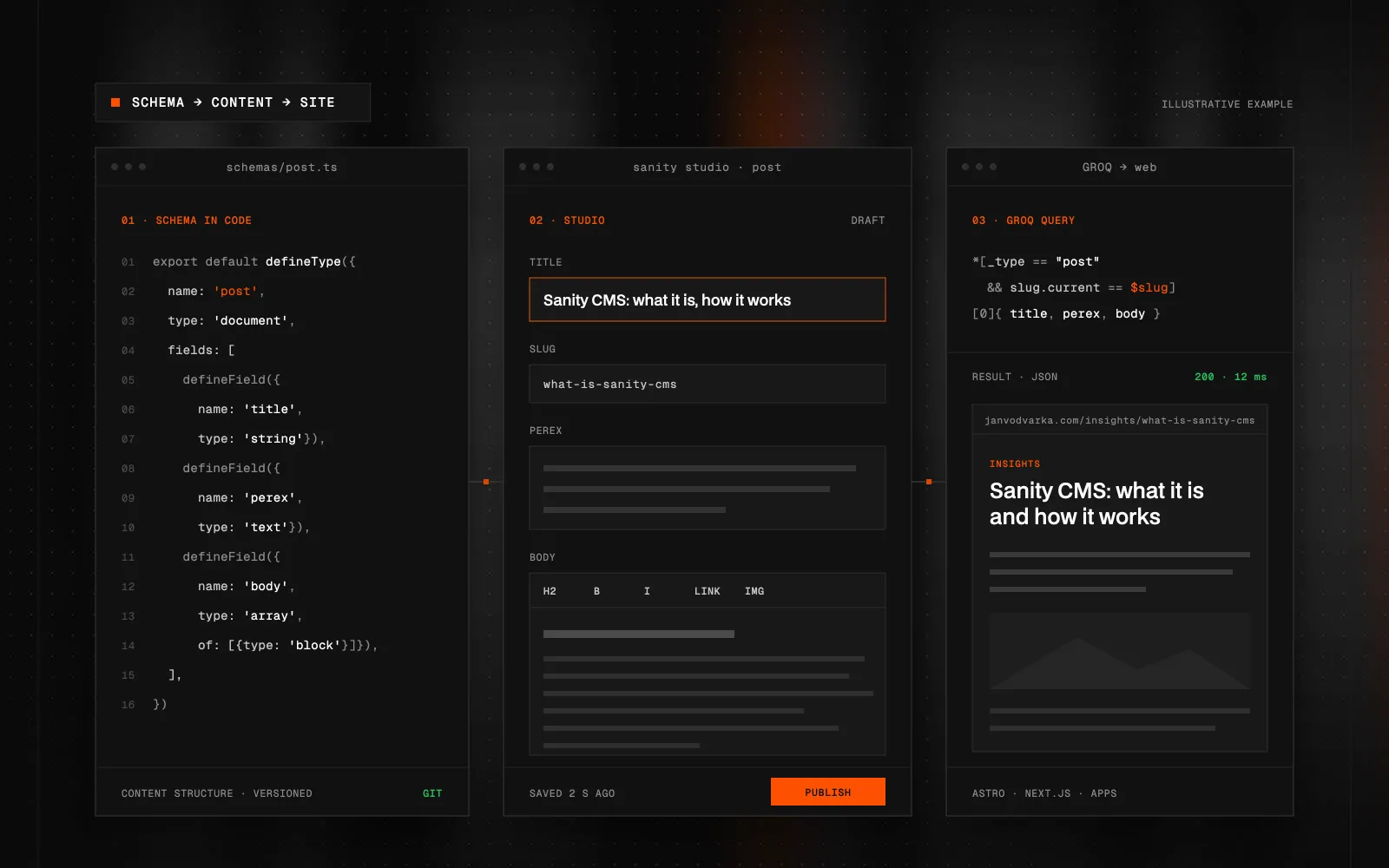
Quick Summary (TL;DR): Sanity is a headless CMS, meaning a content system that manages your content and takes no position at all on how your site looks. Content lives as structured data in the cloud, and you build whatever front end you need on top of it — a Next.js site, a mobile app, an online store, all pulling from the same source. The core idea is structured content: you model content by what things are rather than how they look, so the same data survives a complete redesign. The schema is written in TypeScript, which puts your content model in Git where it gets reviewed like the rest of your code. Sanity Studio, the editing interface, is a React application you shape around the people who actually use it. Content is queried with GROQ, selecting exactly the fields you need. Sanity suits company websites of any size. Its main strength is modularity: the marketing team composes and edits pages from ready-made blocks without a developer, and structured content is reused across pages, languages and channels.
What Sanity CMS is
Sanity is a headless CMS — a content system that deals purely with content and takes no position whatsoever on how your site looks. Content lives as structured data in the cloud, and you build whatever front end you like on top of it: a Next.js website, a mobile app, an online store, a screen in a shop. Everything draws from the same source.
That's the fundamental difference from systems like WordPress or Webflow, where content is bound to a template and to a page. In Sanity you don't have "a page with some text on it". You have an article, a product, a case study — a data object with fields that you render wherever you need it.
I work with Sanity alongside Webflow. They aren't competitors; they're tools for different situations, and below I'll show you how to tell which one is yours.
Headless means the front end is on you
A traditional CMS gives you the admin and the design in one package. The upside is speed; the downside is a ceiling. Whatever the template can't do, you can't do without fighting the system.
A headless CMS splits that package apart. Sanity serves your content over an API and you build the front end yourself. That removes any ceiling on design or performance — but it also means the website doesn't come free with the CMS. Somebody has to build it.
In practice this means a developer first prepares a set of blocks — hero, benefits, case studies, pricing, a form — and connects them to the site's design. From then on the marketing team composes and edits pages from those blocks on their own, without a developer and without worrying about breaking the design.
Structured content: model data, not appearance
This is the idea Sanity rests on, and the single most common place projects go wrong.
You model content by what things are, not by how they look. A field is called features, not threeColumnRow. callToAction, not redButton. The test is simple: if you redesigned the site in two years, would that name still make sense? threeColumnLayout fails — what happens when there are two columns?
It pays off because the same data then works in a new design, in an app and in a newsletter without rewriting a word. Once appearance leaks into your schema, you're back to templates and the entire advantage of going headless is gone.
The schema is written in code
Your data model isn't click-and-drag — you define it in TypeScript. It looks like this:
import { defineType, defineField } from 'sanity'

export const article = defineType({
  name: 'article',
  title: 'Article',
  type: 'document',
  fields: [
    defineField({
      name: 'title',
      type: 'string',
      validation: (rule) => rule.required(),
    }),
    defineField({
      name: 'slug',
      type: 'slug',
      options: { source: 'title' },
    }),
  ],
})
Having the schema in code has a practical consequence: your content model lives in Git. You get change history, you review it in pull requests, and you deploy it like the rest of the application. Click-based systems don't give you that.
Sanity Studio: an editor you shape yourself
Studio is the editing interface — a React application you either host yourself or let Sanity host. It isn't a finished product you take as-is. You can restructure its navigation, add custom input fields, previews and entire tools.
For a client that means an admin built around their content, rather than a generic system where they have to learn what each field is for. Pages are composed from blocks: marketing adds a section, reorders the page or builds a new landing page without a developer. For me that's Sanity's biggest practical advantage: the editor adapts to the editorial team, not the other way round.
GROQ: how content reaches the page
You pull data out of Sanity with a query language called GROQ. It plays a similar role to SQL or GraphQL, but it's designed specifically for structured content:
*[_type == "article" && defined(slug.current)] | order(publishedAt desc) [0...10] {
  title,
  "slug": slug.current,
  publishedAt,
  author->{ name }
}
That query picks up articles that have a slug, sorts them newest first, takes the first ten, and pulls in each author's name from the linked document along the way. The -> arrow is what dereferences that link.
The important part is that you retrieve exactly the fields you want — not the whole document. You feel the difference in page speed.
What people build Sanity with
Sanity is front-end agnostic, but in practice you'll mostly run into these combinations:
- Next.js — the most common choice, with an official
next-sanitypackage and the best live preview support. - Astro — a good fit for content sites where raw speed is the point.
- Nuxt and SvelteKit — when the team is already on Vue or Svelte.
- Shopify Hydrogen — stores where Shopify owns the products and Sanity owns everything else.
The feature clients appreciate most: Visual Editing. An editor clicks text directly in the site preview and Studio opens on exactly that field. It removes the main drawback of going headless — that editors can't see what they're editing.
When Sanity is worth it
Sanity is worth it when:
- The same content needs to appear in several places — site, app, store.
- You have structured content — services, case studies, team, locations, a catalogue — and want to reuse it across pages and languages.
- You want your marketing team to build new pages and landing pages themselves from ready-made blocks, without waiting for a developer.
- You expect to rebuild the site in a few years but keep the content.
Worth keeping in mind:
- Size isn't the deciding factor. Sanity fits a ten-page company site just as well as a large portal — even a small site grows, and marketing needs to keep adding pages and campaigns.
- A developer sets up the blocks at the start. Once they're in place, you compose pages from them yourself — reorder sections, add new ones, build new landing pages.
- The CMS is only half the project. A front end gets built alongside Studio — and in return it matches your design exactly.
Choosing a CMS is a decision for years, so it pays to make it based on how your team will actually work with the site. I work through similar trade-offs in my article on multilingual websites in Webflow.
What to take away
Sanity is for company websites where content is an asset and marketing wants to work with it on their own — composing pages from ready-made blocks and reusing the same content across pages, languages and channels. The front end and the set of blocks get built at the start; after that the site grows without waiting for a developer.
If you're weighing up whether Sanity or Webflow is the better fit for your site, drop me a line. We'll go through how your team will work with the site, and I'll recommend the setup that suits it.
FAQ
What is Sanity CMS?
Sanity is a headless CMS — a system that manages only your content and takes no position on design. Content lives as structured data in the cloud and you build your own front end on top of it, whether that's a website, a mobile app or an online store.
How is Sanity different from WordPress or Webflow?
Your content isn't tied to a template. WordPress and Webflow hand you the admin and the design in one package; Sanity gives you content over an API and leaves the front end to you. That removes any ceiling on design, but it also means the website doesn't come free with the CMS.
Do I need a developer to use Sanity?
To launch, yes. To run it day to day, no. Building the schema, the Studio, the blocks and the front end is developer work, but once the project is live marketing manages content and composes new pages from the prepared blocks in Sanity Studio, without touching code.
What is GROQ?
GROQ is the query language you use to pull content out of Sanity. It plays a similar role to SQL or GraphQL, but it's designed specifically for structured content — you select exactly the fields you need and resolve linked documents in the same query.
Is Sanity a good fit for a smaller company website?
Yes. Sanity suits company websites of every size — even on a ten-page site you'll appreciate that marketing composes pages from ready-made blocks and reuses content like services or case studies across the whole site and in other languages. A developer is needed mainly at the start, to set up the blocks and the front end.
Can I use Sanity content outside my website?
Yes, and it's one of the main reasons people pick Sanity. Content is stored as data, so the same library of articles or products can feed a website, a mobile app and an online store at once.

Got a project a template can't handle?
Tell me what you need. I'll get back with scope, a plan and a price estimate.
STATUS:OPEN FOR PROJECTS· REPLY WITHIN 2 DAYS