article
All articlesHow to Prepare for a Website Migration and What to Expect
A website migration is a chance to make your site faster, tidy up your content and give your editors a better system. Here's what to prepare, how we work together, what happens on launch day and what to expect in the weeks after.
- General
- 6 minutes
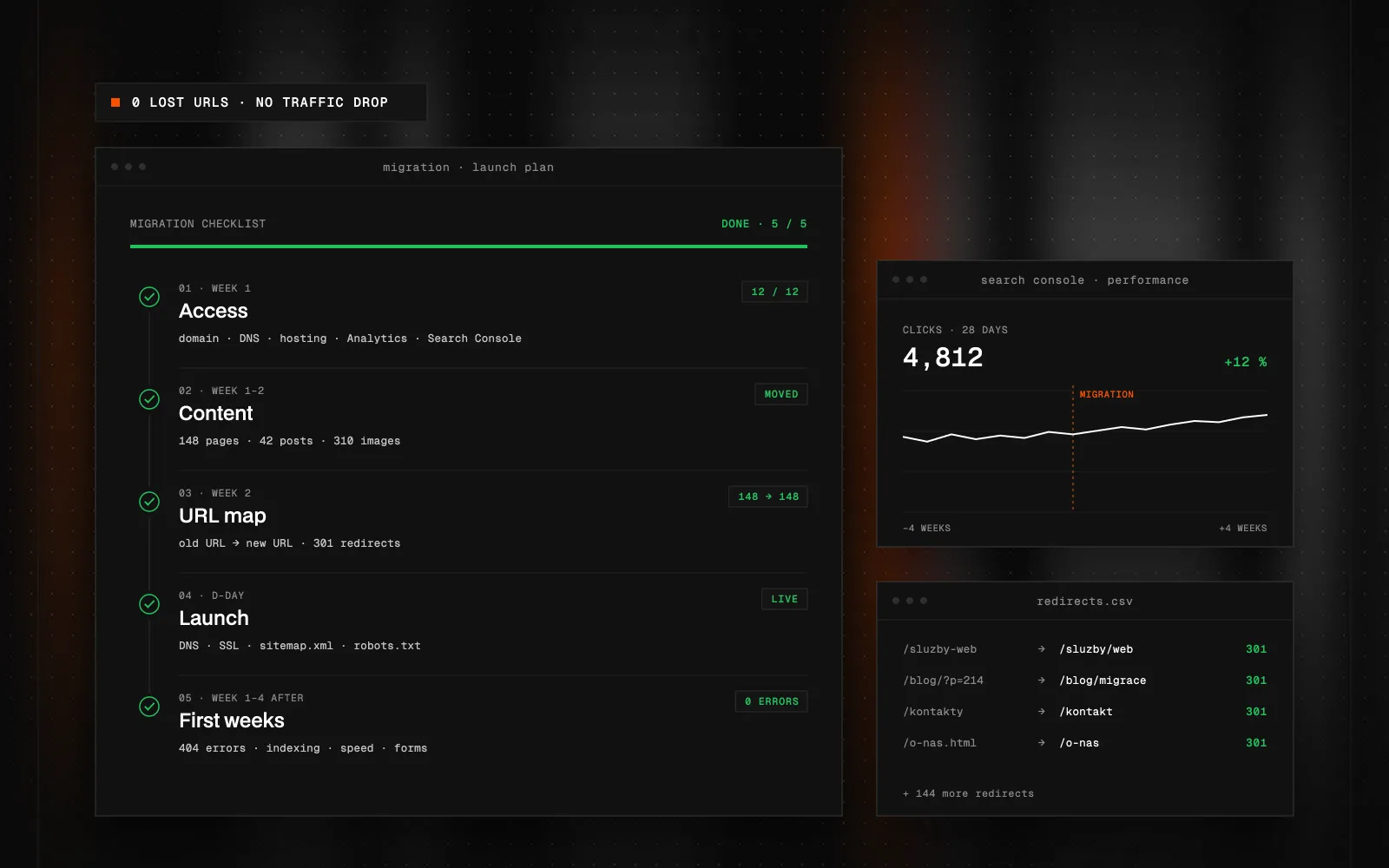
Quick Summary (TL;DR): A website migration means moving your site to a new platform, for example from WordPress or Wix to Webflow, or from Webflow to a custom build on Astro and Sanity. Your content, URLs and search visibility come with you; what changes is what the site runs on. It's a chance to make the site faster, clean up content and make editing easier. Before migrating, prepare access to your domain, site and Google Search Console, decisions about content, a list of important URLs and the goals behind the move. The work has three phases: an audit with a URL map, building on a staging address while the old site keeps running, and a pre-launch check. On launch day the domain is switched, 301 redirects go live, and forms, tracking and key pages are tested. In the first weeks you watch Search Console, traffic and enquiries and fill in any missing redirects. Rankings may move briefly; with a complete URL map they usually settle.
What does a website migration mean?
A migration moves your site to a new platform: from WordPress, Wix or Squarespace to Webflow, or from Webflow to a custom build on Astro and Sanity. Content is transferred, and existing URLs and redirects are mapped out. The aim is to preserve search visibility, but a migration alone cannot guarantee the same rankings.
Migrations are often talked about as a risk. I also see them as an opportunity: to review content, make the site faster and give editors a system that's pleasant to work in. Preparation helps reduce risks, rather than eliminate them all. I don't remove content that brings relevant visitors just because it's old.
What should you prepare before a migration?
You already have most of it; it just needs pulling together. This is the list I start every project with:
- Access. To the current site, the domain and DNS, Google Search Console and analytics. Without DNS access the new site can't go live, so sort that out first.
- Content. What stays, what gets rewritten and what can go. It doesn't need to be finished; you just need to know who makes content decisions.
- A list of URLs. Current addresses of pages, articles and products. I'll build it from the site and its sitemap; you just confirm which pages matter to you.
- Goals. Why you're migrating: a faster site, easier editing, a new design, another language. Every other decision follows from these.
- Integrations. Forms, newsletter, CRM, tracking, cookie banner. What runs on the site and where it sends data.
How does working together look?
My migrations have three phases, and in each one you know what's happening and what comes next.
- Audit and plan. I go through the current site, content, URLs and traffic, and we agree what moves over and what changes. The output is a URL map: every old address gets a new address or a redirect.
- Building on a staging address. The new site is built on the side while the current one keeps running unchanged. Content moves over, and you review and comment directly on the page.
- Pre-launch check. We go through redirects, metadata, forms, tracking and performance. We launch only once everything is ticked off.
What I need from you is mainly quick feedback and one person who makes decisions about content. I handle the technical side.
What happens on launch day?
Thanks to the preparation, launch day is fairly calm. The domain switches to the new site, 301 redirects from the old addresses go live, and straight afterwards I test:
- the DNS switch and working HTTPS,
- redirects against the URL map,
- submitting the new sitemap to Google Search Console,
- forms and conversion tracking.
DNS changes don't spread instantly, so some visitors may still see the old site for a while. That's normal, which is why I switch the old site off some time later rather than on launch day.
What should you expect in the first weeks after launch?
Google has to recrawl and index changed URLs. Rankings and traffic can fluctuate, and neither the extent nor the duration can be guaranteed in advance. Processing depends partly on site size and crawl speed. A URL map and correct redirects help, but do not guarantee the original rankings. After launch I watch:
- Search Console: crawl errors, 404 pages and indexing status.
- Traffic to key pages compared with the period before the migration.
- Forms and enquiries, to make sure they arrive as before.
- What editors report during their first days in the new system.
If an unexpected 404 appears, I check the old URL and add a redirect to the relevant content. Where editors get stuck, I adjust the interface. Post-launch checks and fixes are part of the migration.
What does a migration give you?
Done properly, you get more than a new coat of paint: a faster site, cleaner content structure, a system your editors enjoy working in, and a foundation you can keep building on. When to choose Webflow and when a custom build, I cover in Astro vs. Next.js vs. Webflow.
How I run migrations and which platforms I move sites from is on the Website migration page. If you'd like to talk about yours, drop me a line.
FAQ
Will I lose search rankings during a migration?
If every important URL is kept or 301-redirected and the content stays, rankings usually settle after a short transition. The key is a complete URL map and checking Google Search Console after launch.
Does my current site have to go offline during the migration?
No. The new site is built on a staging address and the old one keeps running unchanged until launch day.
What will you need from me?
Access to your domain, site and Search Console, decisions about content, the goals of the migration and one person who gives feedback. I handle the technical side.
How long does a migration take?
It depends on the size of the site and the amount of content. You get a concrete schedule after the audit, once it's clear what moves over and what changes.
Is a migration a good moment for a redesign?
It can be. Sometimes, though, it's better to move the site 1:1 first and change the design afterwards, so you can tell what affected the results. We decide based on your goals.
What if something breaks after launch?
That's why I keep watching the site after launch. Missing redirects or small editing issues get fixed as they come up in the first weeks.

Got a project a template can't handle?
Tell me what you need. I'll get back with scope, a plan and a price estimate.
STATUS:OPEN FOR PROJECTS· REPLY WITHIN 2 DAYS