article
All articlesCustom Website Maintenance: What Happens After Launch
Launch day is not the finish line. Here is what actually needs updating on a site built with Astro, Next.js and Sanity, how often to do what, how to back up your content, and why every account should belong to your company.
- General
- 6 minutes
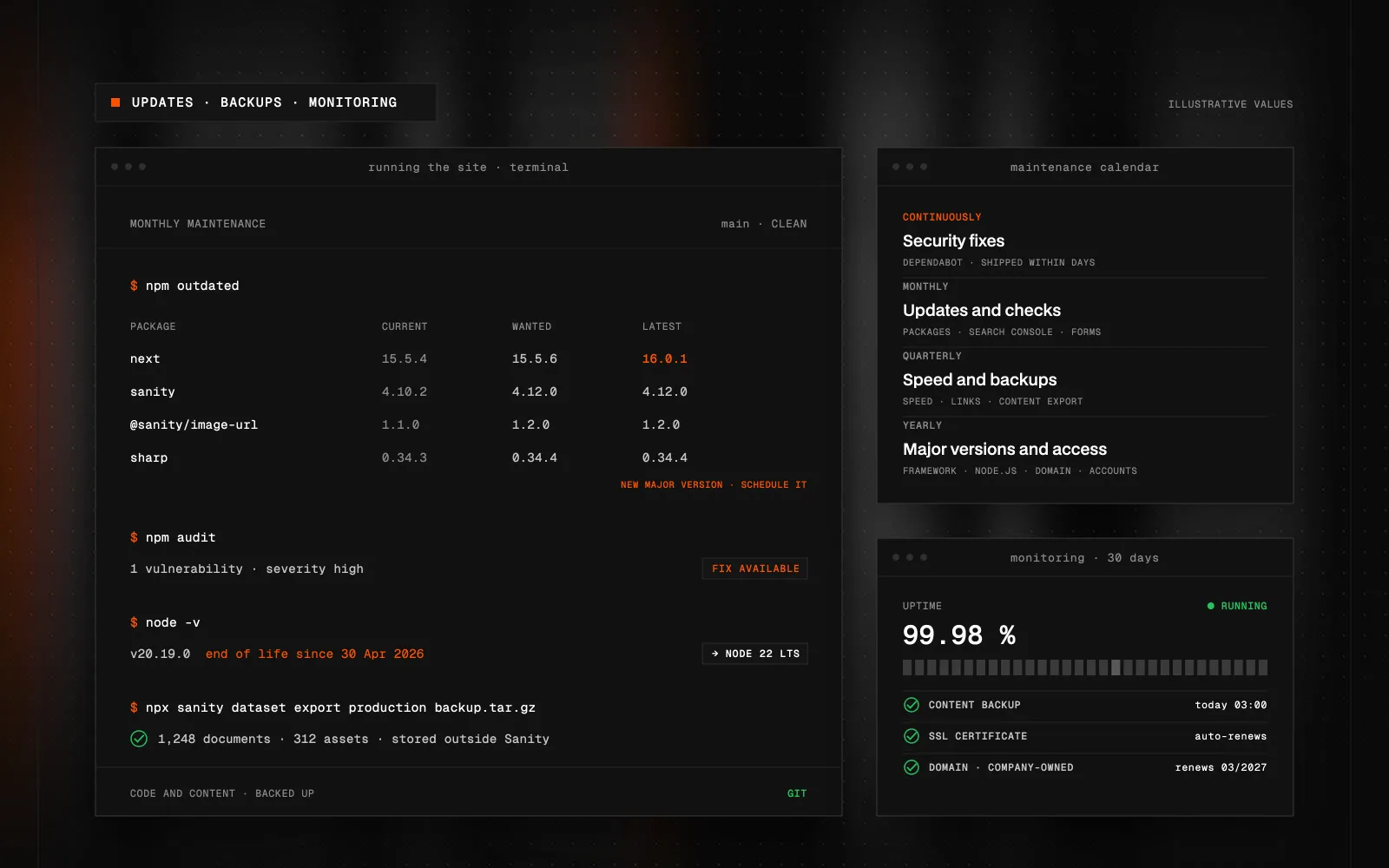
Quick Summary (TL;DR): Custom website maintenance is the set of recurring tasks after launch: framework and dependency updates, security patches, content backups, uptime and form monitoring, and SEO checks. A headless site built with Astro or Next.js and Sanity has fewer moving parts than WordPress, because the content runs in Sanity as a hosted service and there is no CMS server, database or plugin stack to manage. The site's code, however, depends on npm packages and Node.js, and those age. Major framework versions arrive roughly once a year, and every Node.js release has a fixed end-of-life date. Ship security fixes within days, minor updates monthly, and plan major upgrades once a year. Back up Sanity content by exporting the dataset to storage outside Sanity; Git takes care of the code. Keep the domain, hosting, Sanity project and repository in your company's name and add your developer as a team member. Maintenance is prevention; new features are separate work.
What is custom website maintenance?
Custom website maintenance is the set of recurring tasks that keep a site secure, working and current after launch: framework and dependency updates, security patches, content backups, uptime and form monitoring, and SEO checks. It is not about fixing things once they break. It is about making sure they do not.
Headless sites have an edge here. When I build with Astro or Next.js and keep the content in Sanity, the content runs as a hosted cloud service. There is no CMS server, no database and no pile of plugins to babysit, as there would be with WordPress. A statically generated site also gives attackers very little to work with in production.
It still needs care, though. The site's code depends on npm packages and Node.js, and those age even if nobody touches the site.
What actually needs updating?
- The framework. Astro and Next.js each ship a new major version roughly once a year, with smaller releases and fixes in between. Each major version brings breaking changes that require code adjustments.
- Node.js. Every release has a fixed end-of-life date. Node.js 18 reached end of life in April 2025 and Node.js 20 in April 2026. Hosts such as Vercel gradually drop old versions, and one day the site simply will not build.
- npm packages. Libraries for images, forms, animations or validation. Some turn out to have security flaws; others stop being maintained.
- Sanity Studio. The editing interface is the
sanitypackage inside your project. Updates bring fixes and new features for editors. - Integrations. Analytics, newsletter tools, CRMs and payment providers change their APIs. An integration that worked for years will eventually stop.
Why not put updates off?
For security and for practical reasons.
Security: in March 2025, CVE-2025-29927 was disclosed in Next.js. It allowed authorization checks implemented in middleware to be bypassed with a single crafted header. Patched versions were released straight away, so sites with regular maintenance were safe within days. Sites nobody looked after stayed exposed.
Practical: updates pile up. Moving up one major version is routine maintenance. Jumping three at once is a project of its own, and it often reveals that some package you depend on has disappeared in the meantime.
How often should you do what?
This is the default rhythm I start from, adjusted to whatever each site runs:
- Continuously: automated uptime monitoring and alerts for vulnerable dependencies, for example through Dependabot on GitHub. Security fixes go out within days.
- Monthly: minor package updates, a Search Console check (indexing errors, 404 pages) and a form test to confirm enquiries actually arrive.
- Quarterly: a review of speed, broken links and third-party scripts, plus a content backup export.
- Yearly: upgrade to the next major framework and Node.js version, review who has admin access, check the domain and service subscriptions, and retire outdated content.
For a smaller static site, this adds up to hours a month rather than days. Sites with logins, payments or many integrations take more.
Every update goes to a preview deployment first, which hosts like Vercel create automatically for each branch. I check the key pages and forms, and only then does the change go to production. If something still goes wrong, rolling back to the previous version takes one click.
How do you back up content in Sanity?
Sanity keeps a revision history for documents, so text overwritten by mistake comes back in one click. History is not a backup, though. A backup should live outside the service it protects.
The Sanity CLI can export an entire dataset, including images and files, into a single archive:
npx sanity dataset export production backup.tar.gzI set the export up as a scheduled job, for example with GitHub Actions, and store the archive outside Sanity. Git already covers the code, so after a disaster you can restore both the content and the site.
Every now and then, test a restore too, for example by importing the archive into a separate staging dataset. Only then do you know the backup is complete and that restoring takes minutes, not a whole day. A backup nobody has ever restored is a hope, not a plan.
Who should own the accounts?
Your company. The domain, hosting, Sanity project, code repository, Search Console and analytics should all be registered to the business, with your developer added as a team member.
The reason is simple: if you part ways with your developer, or they move on, nothing has to be transferred and nothing gets lost. You grant access to the next person and carry on. Right after launch, I recommend writing down every service, who owns it and when it renews. The most common operational failure I see is not a hacked site. It is a domain nobody renewed because it was billed to a former colleague's card.
How can you tell a site needs maintenance?
A few signs I see on sites nobody has touched for years:
- The build on your host warns about an unsupported Node.js version, or fails outright.
npm auditlists dozens of vulnerabilities, and fixing some of them requires a new major version.- The contact form looks fine, but enquiries stopped arriving because the email service changed its API.
- Nobody in the company knows who has access to the domain or the hosting account.
If more than two of these apply, do not start with new features. Bring the site up to date first; otherwise every change you make will cost more time and money.
What is not part of maintenance?
New development. A new section, a new content type, a redesign or another system integration is separate work with its own brief.
With Sanity, that line is refreshingly clear. Your marketing team builds pages and landing pages from ready-made blocks on their own, so a developer is mainly needed when you want an entirely new block or feature. I explain how I design block-based sites in Sanity CMS Web Development.
Maintenance is usually arranged in one of two ways: a monthly plan with an agreed scope and response time, or on-demand work. For a site that brings in leads or orders, I recommend the monthly plan. That way problems are found by a scheduled check, not by a customer.
Key takeaways
A custom website is not finished at launch. A headless stack with Astro or Next.js and Sanity has fewer moving parts than a traditional CMS, but the framework, Node.js and packages keep ageing. Small, regular maintenance costs less than a big rescue every three years. Back up content outside Sanity and keep every account in your company's name.
If you are figuring out who will look after your site after launch, or you have a site nobody has touched in a while, get in touch. I will review its current state and propose a maintenance plan that fits.
FAQ
What does custom website maintenance include?
Framework, Node.js and package updates, security patches, content backups, uptime and form monitoring, and regular Search Console checks. New features and sections are not included; that is ongoing development.
Does a static Astro site need maintenance too?
Yes, just less of it. A static site has a small attack surface in production, but the framework, packages and Node.js keep ageing, and without updates it will eventually stop building or become hard to extend safely.
How often should a website be updated?
Security fixes within days, minor package updates roughly monthly, and an upgrade to the next major framework and Node.js version once a year.
How do you back up content in Sanity?
By exporting the dataset with the Sanity CLI, which saves documents and assets into a single archive. Automate the export and store it outside Sanity; Git covers the site's code.
Who should own the domain, hosting and Sanity project?
Your company. Your developer should only be a team member on those accounts, so switching providers means nothing to transfer and nothing to lose.
Is a headless site harder to maintain than WordPress?
Usually not. There is no CMS server, database or plugin stack to manage, because the content runs in Sanity as a hosted service. What remains is updating the site's code and its dependencies.

Got a project a template can't handle?
Tell me what you need. I'll get back with scope, a plan and a price estimate.
STATUS:OPEN FOR PROJECTS· REPLY WITHIN 2 DAYS