article
All articlesSanity CMS Web Development: What I Design and Build for You
Sanity on its own doesn't make a website. What matters is how the content model, the blocks and the editor are designed for your team. Here's what I design and build in a Sanity CMS project, how we work together and what drives the cost.
- General
- 6 minutes
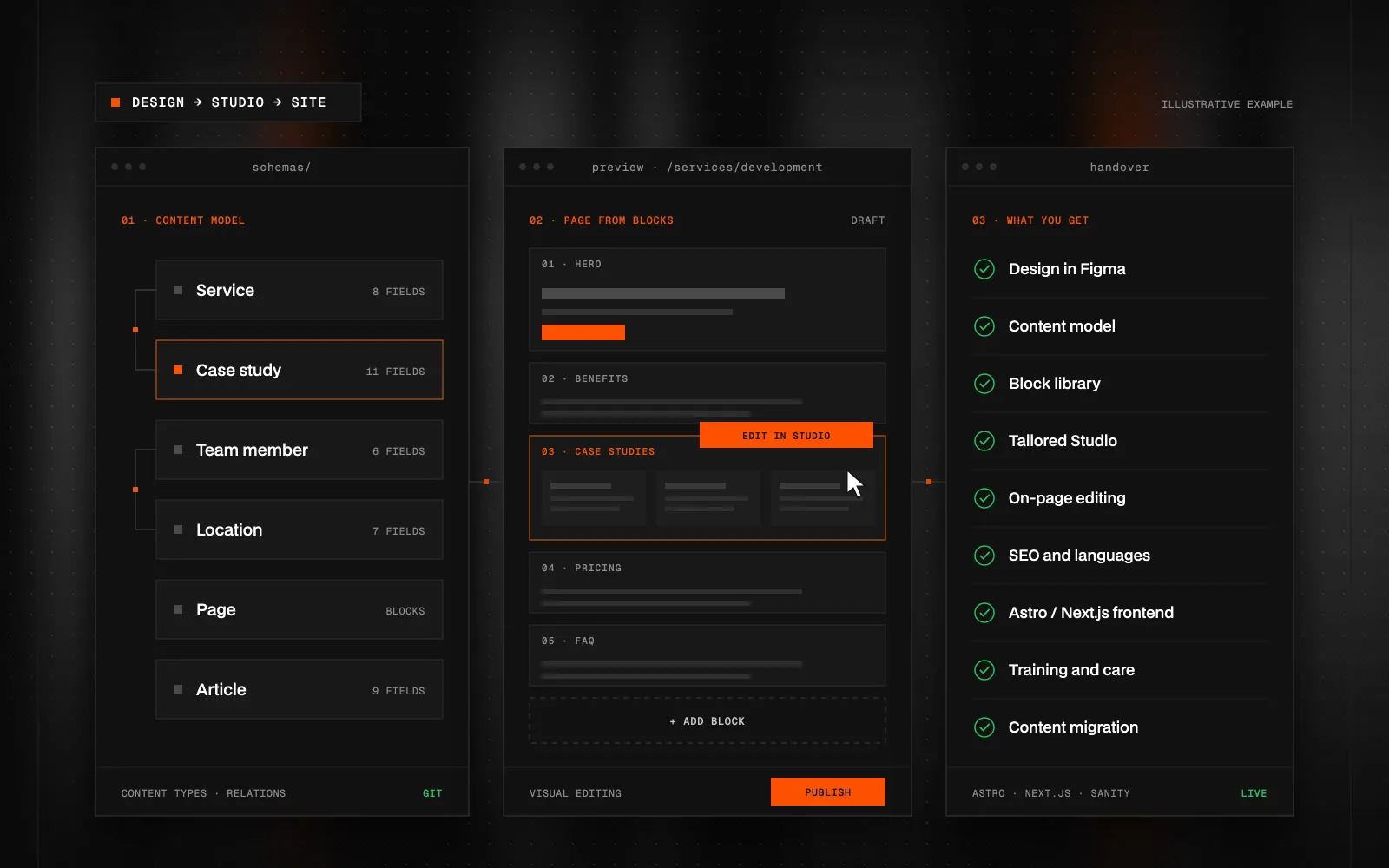
Quick Summary (TL;DR): Sanity CMS web development is designing and building a website whose content lives in Sanity, a headless content management system, while a custom frontend in Astro or Next.js handles how it looks. Sanity itself only provides a content database and an empty Studio. The value of a project is what gets designed on top of it: a content model that mirrors your business, a library of blocks your marketing team uses to assemble pages, a Studio tailored to your editors, editing directly in the site preview, language versions and SEO fields. I do the Figma design, the content model, the Studio and the frontend myself, so nothing gets lost between design and content management. The result is a fast site that still matches the design after the hundredth article, and a team that ships new pages and campaigns without a developer. Cost depends mainly on the number of content types and blocks, languages, integrations and content migration. You get a fixed quote after an intro call.
Sanity CMS web development means I don't just build you a website, I also build the system you'll run it with. Sanity is a headless CMS: it gives you a content database and an editor called Sanity Studio, but it has no opinion on how your site looks or what goes into it. All of that is designed for you.
If you're still figuring out what Sanity is, start with Sanity CMS: What It Is, How It Works, and When It's Worth It. This article covers the other half: what I actually design, build and hand over in a Sanity project.
What do you get when we build your site on Sanity?
Every project includes:
- A website design in Figma — structure, content and visuals for desktop and mobile. Code starts only after you approve it.
- A content model — which content types the site has and how they relate.
- A block library — the sections your team assembles pages from.
- A Sanity Studio tailored to your editors — clear navigation, previews, field hints and validation.
- Editing directly in the site preview (Visual Editing).
- A frontend in Astro or Next.js connected to Sanity.
- SEO and language versions built into the model, not bolted on.
- Training and ongoing care after launch.
I handle design, content model, Studio and frontend myself. You don't have to coordinate a designer, a developer and "the CMS person", and nothing gets lost in handoffs between them.
A content model that mirrors your business
The content model is the most important decision in the whole project. It doesn't describe how the site looks, but what's on it: services, case studies, team members, locations, products, articles, open positions.
Each content type has its own fields and relationships. A case study knows which service it belongs to. A team member knows which office they work at. So case studies show up on the right service page automatically, and when an office changes its phone number, it updates everywhere that office appears. Nothing is copied by hand.
I name fields after what the content is, not how it looks. When a redesign comes along in two years, the content stays and only the frontend changes.
A block library: marketing builds pages on its own
Pages in Sanity are assembled from blocks: hero, benefits, case studies, pricing, FAQ, form, comparison. I design each block in Figma, build it and set up its form in the Studio.
Your marketing team then builds a new landing page by adding blocks, reordering them and filling in copy. No developer, and no risk of breaking the design, because blocks have a fixed look and only a few options that make sense (a light and a dark variant, for example). For me, that's the main reason I recommend Sanity for company websites of every size.
A Studio built for the people who'll use it
An out-of-the-box Sanity Studio is just a list of documents. I shape it so your team can find their way without a manual:
- navigation that follows how you think about the site (pages, services, case studies, settings),
- a preview on every document so you know what you're opening,
- short hints right next to fields,
- validation that flags an overlong SEO title, a missing alt text or an empty required field.
The goal is that a new colleague can edit a page on their first day.
Edit on the page instead of hunting through forms
Visual Editing connects the Studio with a live preview of the site. Click a heading or an image in the preview and the Studio opens the exact field that controls it. You see the result immediately, before anything goes live.
That removes the most common complaint about headless CMSs: editors can't see what they're editing. Work in progress stays a draft until you publish it.
Astro or Next.js?
I pick the frontend based on what the site needs to do:
- Astro for content and company sites where speed and SEO matter most. It ships minimal JavaScript to the browser.
- Next.js for sites that are also applications: logins, a client portal, a configurator, connections to internal systems.
For a deeper comparison, read Astro vs. Next.js vs. Webflow. The site you're reading right now runs on Astro and Sanity.
SEO, languages and AI on top of your content
Every page has fields in the Studio for an SEO title, description and social sharing image. The sitemap, canonical URLs and links between language versions (hreflang) are generated automatically from the content.
For multilingual sites, each document knows its translations. The site connects them correctly on its own, so you don't end up with drifting copies of the same page.
Sanity also offers AI helpers right inside the Studio: suggested translations, alt texts or bulk edits. I set them up so they handle the routine work and you just approve the changes.
How we work together
- Intro call — goals, audience, who will run the site and how often.
- Design in Figma — structure, content and visuals. The content model takes shape alongside.
- Development — frontend, Studio, blocks, forms and integrations.
- Content migration — if you're moving from an existing site, I migrate the content and set up redirects. More on the website migration page.
- Launch and training — I show your team how to run the site.
- Care and growth — new blocks, pages and features as the site grows.
What drives the cost?
The price mainly depends on:
- the number of content types and blocks,
- the number of languages,
- integrations (CRM, newsletter, booking, internal systems),
- how much content needs to be migrated from your current site,
- whether it's a pure content site or also has an application part.
Sanity itself has a free plan that covers many company websites. Paid plans are billed per Studio user. You'll get a concrete scope and quote after the intro call, up front and with no hidden items.
When I'll recommend something else
I'm also a Webflow Premium Partner, so I don't need to build everything on Sanity. If you need a simple presentation site you want to edit visually without a content model, and you're not planning multiple languages or integrations, Webflow may be the better fit. I'll tell you straight.
I'll recommend Sanity when you want your marketing team to build pages on its own, reuse content across the site and languages, and let the site grow without a rebuild.
If you're planning a new website or a move to Sanity, get in touch. We'll look at how your team will work with the site and I'll propose a setup that fits.
FAQ
How much does Sanity CMS web development cost?
It depends on the number of content types and blocks, languages, integrations and content migration. You'll get a concrete scope and quote after an intro call, up front and with no hidden items.
Do I have to pay for a Sanity license?
Sanity has a free plan that covers many company websites. Paid plans are billed per Studio user, so the cost grows with your team, not with your traffic.
Can our marketing team run the site without a developer after launch?
Yes. Copy, images, articles and new landing pages built from ready-made blocks are all managed in the Studio. You only need a developer for new block types or features.
Do you build Sanity sites in Astro or Next.js?
Content and company sites in Astro for speed, sites with an application part such as logins or a client portal in Next.js. I'll recommend one based on what the site needs to do.
Can you migrate content from our current website to Sanity?
Yes. I move the content into the new model, keep important URLs and set up redirects so the site doesn't lose its search rankings.
Do you design the site too, or only develop it?
Both. I design in Figma and code starts only after you approve it, so the design, content model and Studio fit together.

Got a project a template can't handle?
Tell me what you need. I'll get back with scope, a plan and a price estimate.
STATUS:OPEN FOR PROJECTS· REPLY WITHIN 2 DAYS