article
All articlesAnalytics on a Custom Website: GA4, Tag Manager and Cookie Consent Done Right
On a custom-built site, analytics does not come from a plugin. Here is what belongs in a solid setup, how to wire GA4 and Tag Manager to your cookie banner and Consent Mode v2, and how to check that your reports match reality.
- Tutorials
- 7 minutes
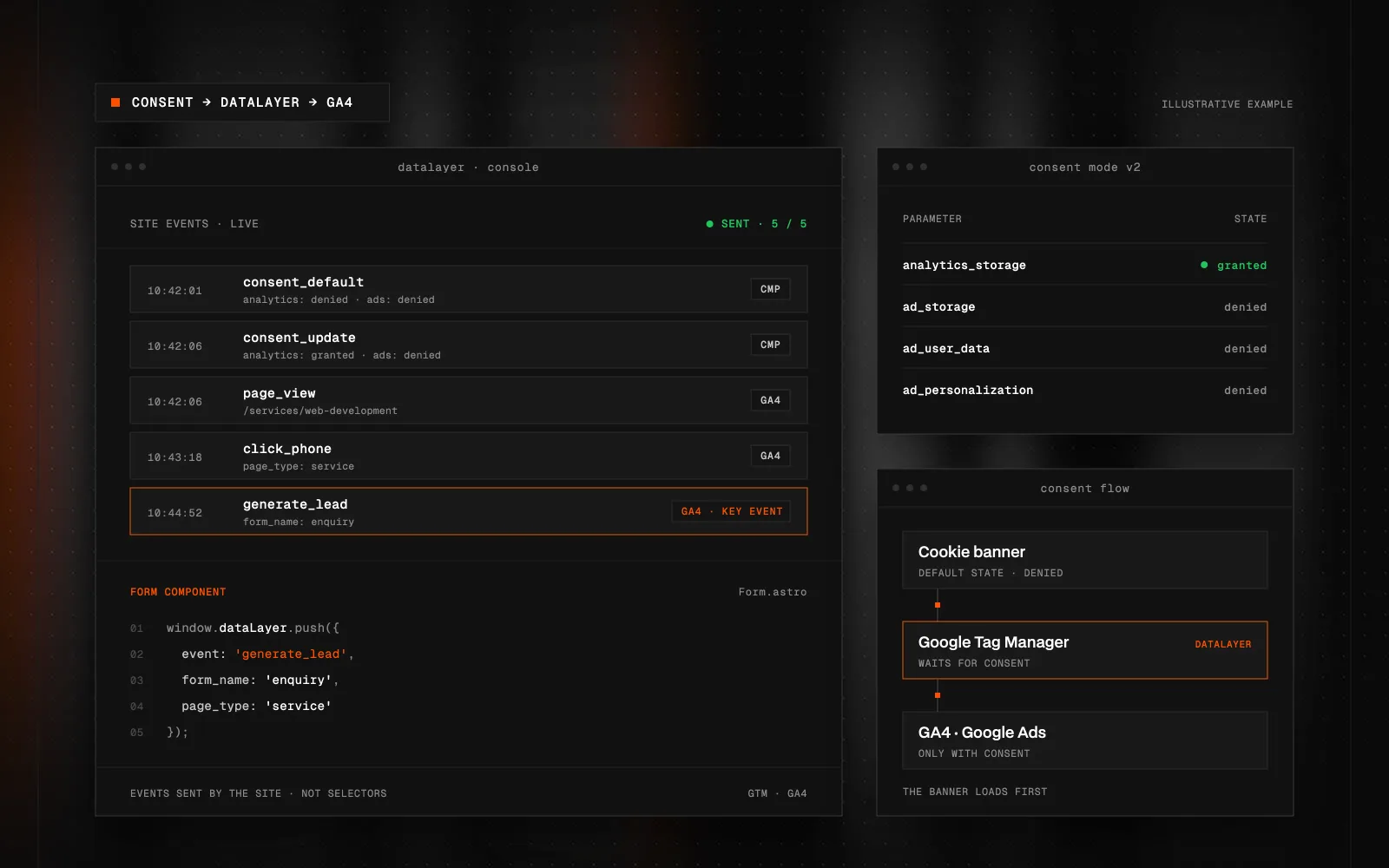
Quick Summary (TL;DR): Website analytics is the set of scripts, events and consent settings that tells marketing where visitors came from and what they did on the site. On a custom site built with Astro or Next.js and Sanity, no plugin switches it on, so it has to be designed during the build. The core is Google Tag Manager, Google Analytics 4, a cookie banner and Consent Mode v2. In the EU, analytics and marketing cookies require prior consent, so the banner must load before any tags. Since March 2024, Google requires Consent Mode v2 for EEA visitors if you want remarketing and personalised ads in Google Ads. Events such as form submissions should be pushed by the site itself into the data layer, not scraped from CSS selectors in GTM. With Next.js, or Astro with view transitions, check that page views are counted correctly. Finally, compare GA4 conversions with what actually reached your inbox or CRM.
Why plan analytics while the site is being built?
Website analytics is the set of scripts, events and consent settings that tells marketing where visitors came from and what they did on the site. On a custom site built with Astro or Next.js, there is no plugin that switches it on with one click. That is both an advantage and a trap: nothing gets onto the site by accident, but nothing works by accident either.
The most expensive mistake I see is leaving analytics until after launch. Campaigns are already running when it turns out the form sends no conversion, the cookie banner blocks tracking even after consent, or page views are only counted on the first load. Data from those first weeks cannot be fixed retroactively.
What belongs in a solid setup?
- Google Tag Manager (GTM): a container where marketing adds tags without touching the code.
- Google Analytics 4 (GA4): the actual measurement of visits and events.
- A cookie banner (CMP): collects the visitor's consent and passes it on.
- Consent Mode v2: the signals the banner uses to tell Google tags what they may do.
- The data layer (dataLayer): the agreement between the site and GTM about which events the site sends and with what data.
Ad pixels such as Meta or LinkedIn plug in the same way: through GTM and under the same consent.
How should the cookie banner work?
In the EU, analytics and marketing cookies may only be set after the visitor actively agrees. Pre-ticked boxes or a line saying that continuing to browse means consent are not enough, and rejecting has to be as easy as accepting.
Technically, order is what matters. The banner must load before any tags, set a default state (everything denied) and update it once the visitor decides. If GA4 loads before the banner, you are setting cookies without consent, even though the banner looks fine on the page.
What is Consent Mode v2 and why do you need it?
Consent Mode defines how Google tags respond to consent. Version 2 added two parameters to ad_storage and analytics_storage: ad_user_data and ad_personalization. Since March 2024, Google requires them for visitors from the EEA if you want to keep using remarketing and personalised advertising in Google Ads.
There are two modes:
- Basic: Google tags do not load at all until consent is given. Simpler, but no consent means no data.
- Advanced: tags always load, but without consent they only send cookieless signals. Google uses them to model the missing data.
Which mode to choose is a decision for marketing and legal, not the developer. My job is to make sure the chosen one actually works.
How do you design events and the data layer?
This is where a custom site really differs from a template. Instead of GTM triggers based on CSS selectors, which break every time the design changes, the site sends events itself. After a successful submission, the form component calls:
window.dataLayer = window.dataLayer || [];
window.dataLayer.push({
  event: 'generate_lead',
  form_name: 'enquiry',
  page_type: 'service'
});
GTM simply reacts to that event. It keeps working even when the button label or a CSS class changes.
I recommend agreeing on the event list up front, in a single table: the name, when it fires, which parameters it carries and whether it is a key event in GA4 (previously called conversions). Typical examples are form submissions, phone and email clicks, file downloads and bookings. For online stores, add the standard GA4 ecommerce events.
What to watch out for with Next.js and Astro?
- Navigation without full reloads. Next.js switches pages without reloading the whole document, and so does Astro with view transitions enabled. Make sure a page view is sent on every URL change. GA4 can handle this through enhanced measurement (browser history changes), but check the setting, or you end up with under-counted or double-counted visits.
- Loading the scripts. Next.js has an official GTM component in the
@next/third-partiespackage. In Astro, I put the snippet in the shared layout so it appears exactly once on every page. - Performance. Every tag in GTM costs the browser work. A container with dozens of tags can slow down responsiveness more than the rest of the code combined. Review now and then what is in it and what anyone still looks at.
- Previews and staging. Tracking should run on the production domain only. Otherwise CMS previews and test deployments pollute your data.
Does tracking belong in Sanity?
Partly. I keep the GTM container ID in the site settings in Sanity, so marketing can change it without a new deployment. I do not recommend pasting arbitrary scripts through the CMS, though. It breaks the order relative to the cookie banner, and six months later nobody knows what is running on the site. New tags belong in GTM; Sanity is for content and the modular blocks marketing uses to build pages.
How do you check that tracking works?
- Open the site in a private window and check that no
_gacookies are set before consent. - In GTM preview mode (Tag Assistant), walk through accepting, rejecting and submitting a form.
- In GA4 DebugView, confirm that events arrive with the right parameters.
- Test page-to-page navigation and arriving via a campaign link with UTM parameters.
- After a week, compare form submissions in GA4 with what actually reached your inbox or CRM.
The last step matters most and few people do it. A small gap is normal, because some visitors decline consent. A gap of tens of percent means something is misconfigured.
Checking analytics also belongs in regular website maintenance after launch, and in preparing for a website migration when you move off an old platform.
What is the takeaway?
Analytics on a custom site is designed just like the content: up front, with clearly named events and in the right order relative to consent. Then you get data marketing can trust, and a GTM setup that does not need fixing after every redesign.
If you are planning a new site, or your GA4 numbers do not match reality, get in touch. I will review your setup with you and suggest what to fix.
FAQ
Does a custom website need a cookie banner?
Yes, if it uses analytics or marketing cookies such as GA4 or ad pixels. In the EU these require prior active consent; without a banner you may only use strictly necessary cookies.
What is Consent Mode v2?
The way a cookie banner passes consent status to Google tags, including the ad_user_data and ad_personalization parameters. Since March 2024, Google requires it for EEA visitors to use remarketing and personalised ads.
Do I need Google Tag Manager if I only use GA4?
It is not mandatory, but I recommend it. Marketing can then add more tags without a developer, and consent is handled in one place.
Why does GA4 show fewer conversions than the enquiries I receive?
Some visitors decline consent, so a small gap is normal. A large gap usually means the event is not sent reliably or tags load in the wrong order relative to the cookie banner.
Does GA4 count page views correctly in Next.js?
It can, but you need to verify it. Next.js changes pages without a full reload, so page views must be captured by GA4 enhanced measurement via browser history changes, or sent by the site itself.
Can I add tracking scripts directly through Sanity?
I do not recommend it. Keep the GTM container ID in Sanity, but manage the tags themselves in GTM so they respect consent and you know what is running on the site.

Got a project a template can't handle?
Tell me what you need. I'll get back with scope, a plan and a price estimate.
STATUS:OPEN FOR PROJECTS· REPLY WITHIN 2 DAYS