article
All articlesWordPress or a Headless CMS? When It's Worth Switching
WordPress runs a huge share of the web, and for plenty of sites it's still a good choice. Here's how to tell when your site has outgrown it, what changes for your marketing team after moving to a headless CMS, and how the switch actually works.
- General
- 7 minutes
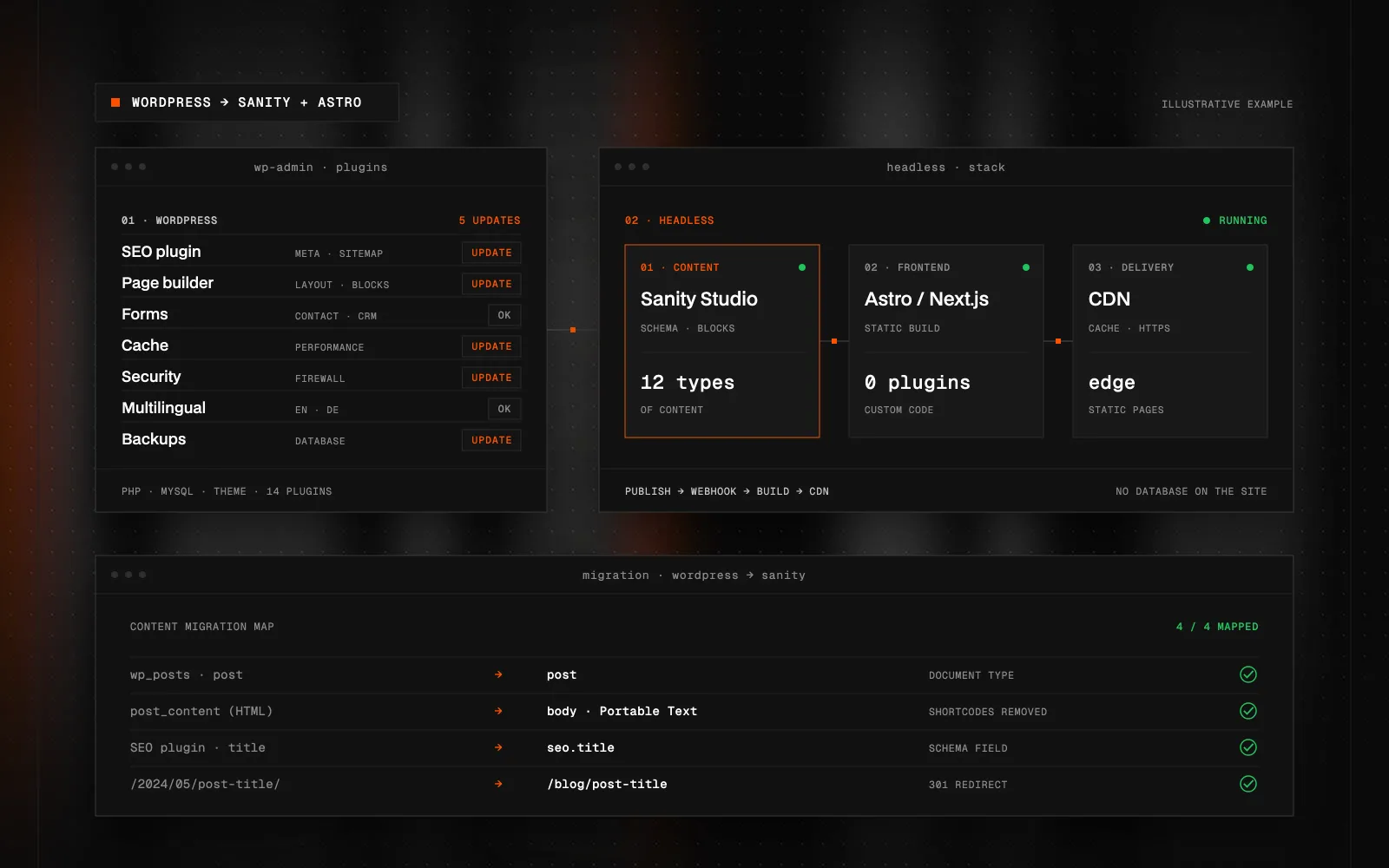
Quick Summary (TL;DR): A headless CMS is a content management system that only manages content and delivers it through an API to a separately built website, for example one made with Astro or Next.js. WordPress, by contrast, keeps content and presentation in one system with a theme and plugins. Moving from WordPress to a headless CMS such as Sanity pays off when plugins and their updates hold you back, the site stays slow despite every caching layer, marketing needs to build pages from blocks without breaking the design, or the same content is reused in several places. It doesn't pay off when the site works, rarely changes and depends on a plugin with no real replacement, typically a large WooCommerce store. The switch is more than a data export: content is converted into structure, plugin features are replaced with specific services and every old URL needs a redirect. Editors get a tailored CMS with preview, and the site runs from a CDN.
What does moving from WordPress to a headless CMS actually mean?
A headless CMS manages content and nothing else. How the site looks and loads is handled by a separate application, built with Astro or Next.js for example, which pulls the content through an API. WordPress keeps both together: content, theme, plugins and admin all run in a single PHP and MySQL installation.
So switching doesn't mean "a different WordPress". It means splitting the site into two parts: the editing environment (in my projects usually Sanity) and a custom-built frontend deployed to a CDN or as static pages.
How can you tell your site has outgrown WordPress?
WordPress isn't a bad system. Trouble starts when it gradually takes on jobs it was never designed for. The signs I see most often on company websites:
- Dozens of plugins and a fear of updates. Every update is a small gamble on whether a form or layout breaks. Skip updates and the security risk grows, because plugins are among the most common entry points for attacks.
- A slow site despite all the caching. Page builders generate a lot of HTML, CSS and JavaScript. A caching plugin hides some of it, but you still feel it on mobile.
- Marketing is afraid to touch pages. The page builder offers freedom, but a few edits and the layout falls apart. Or the opposite: every new landing page needs a developer.
- Content in several places. You want the same products, case studies or locations on the website, in an app or in another language, and in WordPress you copy them by hand.
- Custom features held together with workarounds. A calculator, a filter, a CRM integration. In WordPress that often means one more plugin that only half does the job.
If two or more of these sound familiar, a switch is worth considering.
When should you stay on WordPress?
It would be dishonest to claim headless is the answer to everything. I'd stay on WordPress when:
- the site works, is fast and changes a few times a year,
- the business depends on a plugin with no sensible replacement, typically a large WooCommerce store or a membership area,
- there's no budget for a new frontend and the real pain is just an outdated look. A new theme and a plugin clean-up often do the job.
And if what you mainly want is a visual editor and a fast launch without custom development, have a look at Astro vs. Next.js vs. Webflow.
What changes for your marketing and content team?
The biggest difference is how you work with content. In WordPress a page is usually one big block of HTML from the editor or page builder. In Sanity I design content as structure: an article has a summary, an author, a category and SEO fields. A case study has a client, an outcome and a photo. A landing page is assembled from modular blocks such as a hero, benefits, testimonials, pricing or an FAQ.
For marketing, that means:
- New pages without a developer. You assemble them from ready-made blocks that keep the design intact. Spacing and typography can't drift.
- Preview before publishing. Sanity can connect previews directly to the frontend, so you see the page exactly as it will look before it goes live.
- An editor shaped around your content. No sidebar full of menu items from plugins nobody uses. Just what your team needs.
- Real-time collaboration. Several people can work on content at once, and changes can be rolled back from the history.
There's a short adjustment period, because the editor looks different from wp-admin. In my experience, though, most people find a structured editor simpler than a page builder.
How is content moved out of WordPress?
I cover the general migration process in how to prepare for a website migration. What's specific to moving from WordPress to headless:
- Audit content and plugins. I list the content types, custom fields, taxonomies and, above all, what each plugin actually does. Often half of them turn out to be unnecessary.
- Design the schema in Sanity. WordPress posts, pages and custom post types become a structure that matches how you think about your content, not how a plugin once stored it.
- Export via the REST API. WordPress has a built-in REST API that exposes posts, pages, categories, authors and media.
- Convert HTML into structured text. Content from the WordPress editor is HTML. I convert it into Portable Text, Sanity's rich-text format, cleaning out inline styles and leftover page-builder shortcodes along the way. This is the step migrations most often underestimate.
- Images and files. They go into Sanity, where the image CDN serves them at the right size and in modern formats.
- URL map and redirects. Every old address, including category archives and pagination, needs a 301 redirect to its new home. Skip it and you lose search rankings. For the rest of the technical SEO checklist, see Headless SEO.
I write the migration as a script rather than copying things by hand. It can be re-run right before launch, so nothing gets lost even if the team keeps publishing in the meantime.
What replaces the plugins?
Every plugin did a job, and that job doesn't disappear. It's just handled differently:
- The SEO plugin is replaced by SEO fields in the schema (title, description, social image) and a sitemap generated by the frontend.
- Caching and optimisation plugins go away. Pages are generated statically or cached on a CDN by design.
- Forms are handled by a small server function or a dedicated service, which can pass submissions straight to your CRM.
- Security plugins are needed far less. The public site has no database or admin login at the same address, so the attack surface is much smaller.
- Multilingual content is handled in the content schema and the frontend routing.
How much work is a switch?
It depends mostly on the amount and quality of the content, not the page count. A company site with a few dozen pages and clean content is a different job from a magazine with thousands of articles built with several page builders over the years. That's why I start with an audit: afterwards it's clear what can be converted automatically, what needs manual clean-up and which features have to be rebuilt. Only then does an estimate make sense.
For life after launch, see website maintenance after launch, and for how I build sites with Sanity, see Sanity CMS web development.
Wondering whether your WordPress site still makes sense or it's time to go headless? Get in touch. I'll go through your site and plugins with you and tell you straight whether switching is worth it.
FAQ
What is a headless CMS?
It's a content management system that only manages content and delivers it through an API to a separately built website or app. The frontend, built with Astro or Next.js for example, handles design and performance.
Is it worth moving from WordPress to a headless CMS?
Usually yes if plugins, speed or rigid content editing are holding you back. Often not if the site works, rarely changes or depends on a plugin with no replacement.
Will I lose search rankings when switching?
You shouldn't. The key is to carry over SEO fields, keep the content and set up a 301 redirect for every old URL. Short-term fluctuation is normal; a lasting drop usually points to a redirect mistake.
Can our content team use Sanity without a developer?
Yes. The editor is designed around your content and new pages are assembled from ready-made blocks, so day-to-day work doesn't need a developer.
Can a WooCommerce store be migrated too?
It can, but it's a much bigger project because the cart, payments and order management change as well. For large stores I often recommend staying on WooCommerce or moving to a dedicated e-commerce platform.
How long does a WordPress migration take?
It depends on the amount and quality of the content and on which features need rebuilding. I only give a firm estimate after auditing the content and plugins.

Got a project a template can't handle?
Tell me what you need. I'll get back with scope, a plan and a price estimate.
STATUS:OPEN FOR PROJECTS· REPLY WITHIN 2 DAYS