article
All articlesHeadless SEO: What to Get Right with Astro and Next.js
A headless site isn't worse for SEO, but nothing gets handled for you. Here's what has to be built in from the start: server-rendered HTML, SEO fields in Sanity, sitemaps, status codes and redirects.
- Tutorials
- 7 minutes
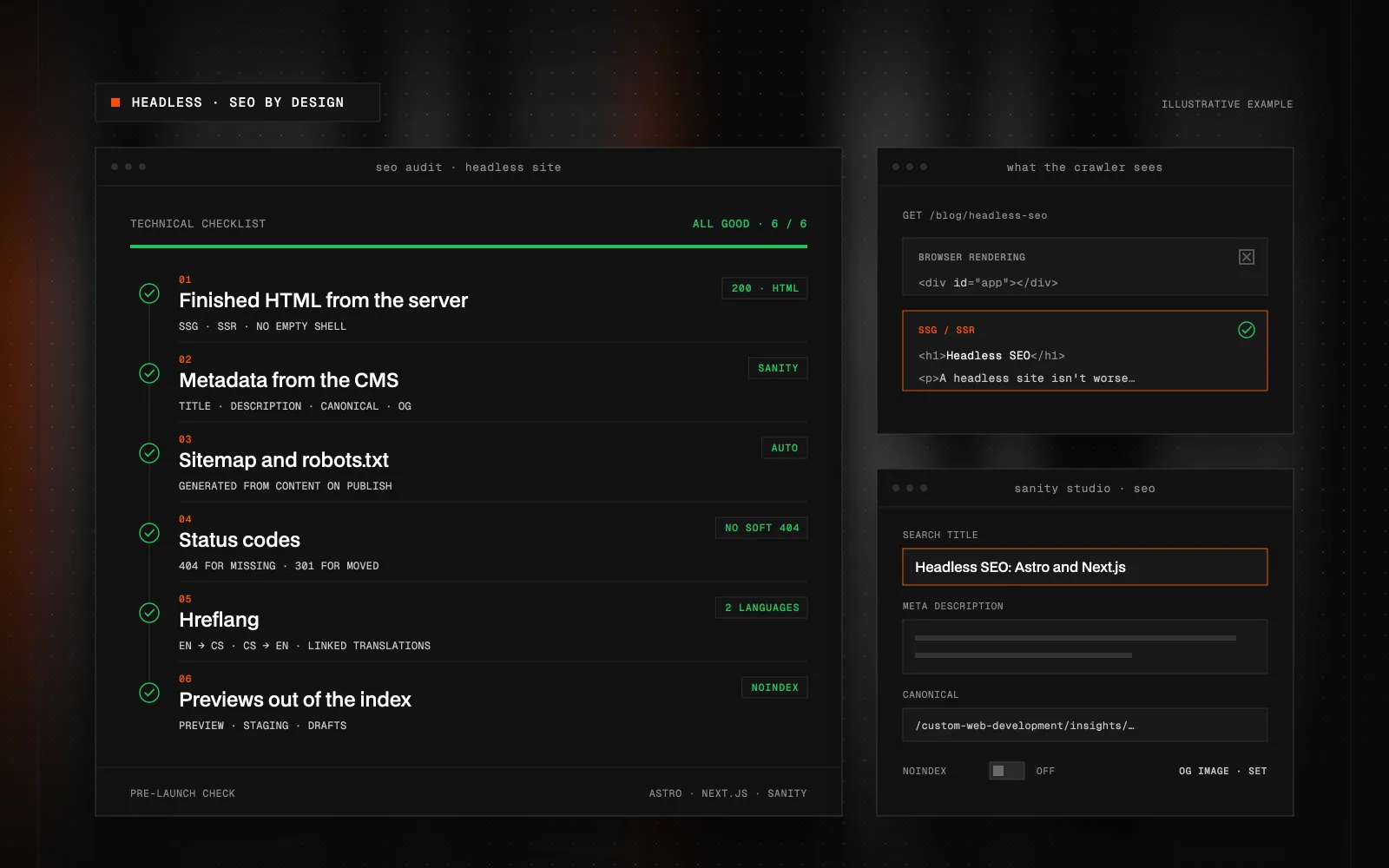
Quick Summary (TL;DR): A headless website is one where a separate CMS, such as Sanity, manages the content and a frontend built with Astro or Next.js renders the pages. It isn't worse for SEO than a traditional site, but nothing comes for free: nobody handles the sitemap, metadata or redirects for you. The most important thing is that the server sends finished HTML, through static generation or server-side rendering, because many crawlers don't run JavaScript and Google processes it with a delay. Titles, meta descriptions, canonical URLs, social images and a noindex switch belong in the Sanity content model so marketers can edit them themselves. The sitemap and robots.txt are generated from content, missing pages must return a real 404 and 301 redirects can be managed right in the CMS. Commonly forgotten: indexed preview environments, hreflang on multilingual sites, required alt text and rebuilding pages after publishing. Built in from the start, these basics give a headless site a strong SEO foundation.
Is a headless website worse for SEO?
No. A headless website is one where a separate CMS (such as Sanity) manages the content and a frontend built with Astro or Next.js renders the pages. Search engines don't care where the content comes from. They care about the HTML they receive, the status code the page returns and whether the metadata is there.
The catch is elsewhere. Traditional platforms like WordPress or Webflow handle a lot of SEO for you: the sitemap, canonical URLs, redirects, fields for meta descriptions. On a headless site, none of that appears by itself. It has to be designed and built. Skip it and you get a site that looks great and that nobody finds in search. That's why I run the same technical checklist on every headless project.
Does the search engine get finished HTML?
This is the first and most important question. If the page content is assembled in the browser by JavaScript (client-side rendering), a crawler gets an empty shell on first load. Google can render JavaScript, but it does so with a delay. Many other bots, including most AI search crawlers according to available measurements, don't run it at all.
The fix is to send finished HTML from the server:
- Static site generation (SSG): pages are built at build time. Astro's default and ideal for content sites.
- Server-side rendering (SSR): the page is assembled on the server on each request. In Next.js with the App Router, React Server Components make this the default.
- Incremental regeneration: a static page that rebuilds itself when content changes in the CMS.
A quick test: open "View page source" on your site. If you can't see the article heading and text there, some bots can't either. For a more precise view, the URL Inspection tool in Search Console shows the rendered HTML the way Google sees it.
Where do titles, descriptions and canonical URLs come from?
On a headless site, from the CMS. But only if you plan for them in the content model. In Sanity, I add an SEO object to every page type: a search title, meta description, social sharing image, canonical URL and a noindex switch. If a field is left empty, the frontend falls back to a sensible default, such as the page heading and intro.
In Next.js, the Metadata API takes care of it:
export async function generateMetadata({ params }) {
  const { slug } = await params
  const page = await getPage(slug)
  return {
    title: page.seo?.title ?? page.title,
    description: page.seo?.description ?? page.perex,
    alternates: { canonical: `https://example.com/${slug}` },
    robots: page.seo?.noindex ? { index: false } : undefined,
  }
}
In Astro, you output the same data in the <head> of a shared layout. The upside is that your marketing team edits metadata themselves in Sanity Studio instead of waiting for a developer.
Does the site have a sitemap and robots.txt?
It has to. On a headless site, it's best to generate the sitemap automatically from content, so a new page or article is in the sitemap the moment you publish it.
- Astro has the official
@astrojs/sitemapintegration. - Next.js generates both the sitemap and robots.txt from
app/sitemap.tsandapp/robots.ts.
Only canonical, indexable pages returning 200 belong in the sitemap. No drafts, no noindex pages and no redirected URLs.
Does a missing page really return a 404?
Sites built as single-page apps often return a 200 for a non-existent URL and just display "Page not found". Google calls this a soft 404. Make sure a non-existent slug returns a real 404 status code. In Next.js, use the notFound() function; in Astro, a 404.astro page, and with server rendering, Astro.response.status.
Who takes care of redirects?
When you redesign or rename a page, the old URL has to point to the new one with a 301 redirect. On a headless site, I recommend managing redirects as content: Sanity holds a list of "old URL → new URL" and the frontend or host loads it at build time. That way marketers add redirects themselves when they change the site structure. I cover redirects in more detail in the article on preparing for a website migration.
What gets forgotten most often?
- Preview environments in the index. Staging and preview versions need noindex or a password, otherwise they compete with the live site.
- Drafts leaking out. Unpublished CMS content must not end up in the sitemap or on public pages.
- Stale pages after publishing. If pages are generated statically, publishing in the CMS has to refresh them. A Sanity webhook triggers a new build or regenerates only the changed pages.
- Hreflang on multilingual sites. Each language version should point to the others. In Sanity you link the translations, and the frontend generates the alternate links from them.
- Alt text. Make the image description field required in Sanity. Validation is cheaper than an audit.
- Structured data. JSON-LD for an article, organisation or product is built from the same fields as the page, so it never drifts from the content.
- Consistent URLs. Decide once whether URLs end with a trailing slash and stick to it everywhere, in links and in the sitemap.
Why is it worth building properly?
Because once these basics are in place, a headless site has better-than-average SEO conditions. Static HTML is fast, the code contains only what it should, and metadata is structured data instead of fields someone fills in by hand across a hundred pages. Marketers then assemble new landing pages from ready-made blocks in Sanity, and each one gets SEO fields, a sitemap entry and a canonical URL automatically.
I explain how blocks work in Sanity in Sanity CMS: What It Is, How It Works, and When It's Worth It. For choosing a framework, see Astro vs. Next.js vs. Webflow, and for visibility in AI answers, How to Optimize a Website for AI Search Engines.
Key takeaways
A headless site isn't an SEO handicap, but nothing comes for free. What matters is finished HTML from the server, SEO fields in the content model, an automatic sitemap, correct status codes and redirects managed in the CMS. When that's part of the design from day one, your marketing team works on content, not technical bugs.
Planning a headless site, or already running one and not sure it's technically sound for search engines? Get in touch. I'll go through it against this checklist and tell you what to fix first.
FAQ
Is a headless website worse for SEO than WordPress or Webflow?
No, as long as it serves finished HTML and has the technical basics in place. The difference is that someone has to design and build the sitemap, metadata and redirects; they don't come with the platform.
Can Google index websites rendered with JavaScript?
Yes, but it renders them with a delay. Many other bots, including most AI search crawlers, don't run JavaScript, so serving finished HTML from the server is the safer choice.
Which is better for SEO, Astro or Next.js?
Both work well when pages are statically generated or server-rendered. Astro suits content sites, Next.js projects with application logic. SEO depends more on how metadata, the sitemap and status codes are built.
Can my marketing team manage SEO on a headless site themselves?
Yes, if SEO fields are part of the content model. In Sanity, you then edit titles, descriptions, social images, noindex and redirects without a developer.
How can I tell whether my site serves finished HTML to search engines?
Open the page source in your browser and check whether the heading and text are there. For a more precise check, use the URL Inspection tool in Search Console, which shows the rendered page.
Does a headless website need an SEO plugin?
No, there's no plugin like on WordPress. SEO is part of the frontend code and the CMS content model, which is an advantage: it works the same on every new page.

Got a project a template can't handle?
Tell me what you need. I'll get back with scope, a plan and a price estimate.
STATUS:OPEN FOR PROJECTS· REPLY WITHIN 2 DAYS